
Testimonials
This feature has two independent parts:
- Testimonials block: a checkout extension that shows full customer review cards (name, stars, review text) on the checkout page.
- Ratings on upsells: shows star rating average and review count for each product inside upsell across checkout, thank you page, order status page, and post-purchase upsell.
Supported review apps: Judge.me, Okendo
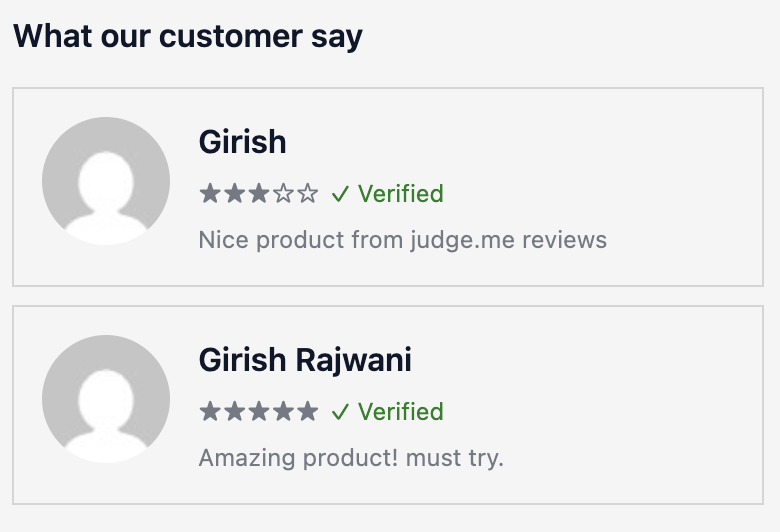
How to set up
Section titled “How to set up”Testimonials block
- Go to Testimonials in the app.
- Click Save.
- Configure display settings (see below).
- In the Shopify checkout editor, add the Testimonials block to the checkout page.
Ratings on upsells
- Go to Testimonials in the app and select your review app (if not already done).
- For each upsell placement, toggle ratings on and choose a position (below title or below price).
- Click Save. Ratings will appear automatically for each product inside upsell so make sure you have added upsell on checkout page or [thank you page](http://localhost:4321/apps/checkout-extender/docs/revenue/thank you-page-upsell/) or order status page or on all 3.
Display settings
Section titled “Display settings”Testimonials block (checkout extension)
| Setting | Description |
|---|---|
| Review app | Select one of the supported review apps to pull reviews from |
| Status | Enable or disable the testimonials block |
| Section heading | Text shown above the reviews (e.g. “What our customers say”) |
| Reviews per product | Max reviews to show per product (1–5) |
| Display mode | Stacked shows 4 reviews per page with pagination arrows if there are more than 4. Carousel shows one review at a time. |
| Show arrows | Toggle prev/next arrows on the carousel. In stacked mode, arrows appear automatically when there are more than 4 reviews. |
| Auto-slide | Automatically advance to the next review |
| Auto-slide interval | Seconds between auto-advances |
Ratings on upsells
Show star rating average and review count for each product inside upsell. Configure per placement:
| Placement | Options |
|---|---|
| Checkout Upsell | Toggle on/off, position: Below title or Below price |
| Thank You Page & Order Status Page Upsell | Toggle on/off, position: Below title or Below price |
| Post-Purchase Upsell | Toggle on/off, position: Below title or Below price |
- Only one review app can be active at a time.
- The testimonials block fetches reviews based on the products in the customer’s cart. If a product has no reviews, the block shows nothing.
- Ratings on upsells pull from the same review app. No separate setup needed once the app is connected.
- Make sure your review app has collected reviews before enabling this feature.
Use cases
Section titled “Use cases”- Testimonials block: show a carousel of 2–3 reviews on the checkout page to reassure hesitant customers before they complete the order
- Ratings on checkout upsell: show star average and review count on the upsell product to make the add feel lower risk
- Ratings on thank you page / order status page upsell: reinforce the upsell offer with social proof when the customer is reviewing their order
- Ratings on post-purchase: validate the upsell product with reviews before the customer decides
Best practices
Section titled “Best practices”- Enable testimonials only after you have at least 5–10 reviews per product. A block with nothing to show is wasted space.
- Use Carousel mode for checkout upsells to keep it compact. Use Stacked for when there’s more space.
- Set Reviews per product to 3 maximum at checkout as customers are in a hurry and won’t read more.
- Position reviews below price in checkout upsells so the price is seen first, then validated by the review.
- Use testimonials alongside Trust Badges for maximum reassurance at checkout.