
Gift Note
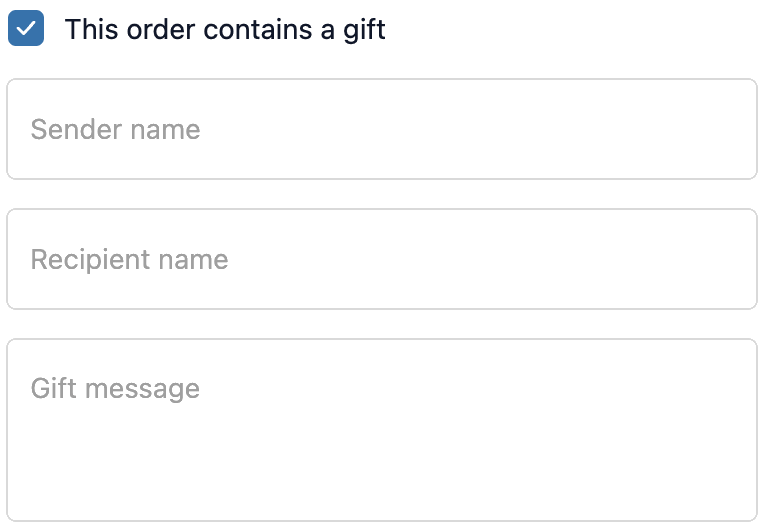
The Gift Note extension adds a “This order contains a gift” checkbox to checkout. When the customer checks it, three additional fields expand: sender name, recipient name, and a personalised message. All data is saved with the order.
How to set up
Section titled “How to set up”- Go to Gift Note in the app.
- Configure display settings (see below).
- Click Save.
- In the Shopify checkout editor, add the Gift Note block to the desired page(s).
Display settings
Section titled “Display settings”| Setting | Description |
|---|---|
| Status | Toggle to enable or disable the extension |
| Checkbox heading | The label shown next to the checkbox |
| Sender name placeholder | Hint text inside the sender name field |
| Recipient name placeholder | Hint text inside the recipient name field |
| Note / message placeholder | Hint text inside the gift message field |
- The fields are hidden until the customer checks the checkbox, so there’s no clutter for customers who are not sending a gift.
- Gift note data is saved as order attributes and is visible on the order in your Shopify admin.
- Works on checkout page only.
- For a simple single-line note without the gift checkbox, use Order Note instead.
Best practices
Section titled “Best practices”- Keep placeholder text helpful: “Write your personal message here (max 200 characters)”.
- Use the gift note data in your fulfillment workflow. Include it on your packing slip template in Shopify admin.
- Don’t make the fields mandatory. Gift notes should always be optional.
- Place the block before the contact section so it’s visible early in the checkout flow.
When to use this vs Order Note vs Delivery Instructions
Section titled “When to use this vs Order Note vs Delivery Instructions”| Gift Note | Order Note | Delivery Instructions |
|---|---|---|
| For gift-specific info: sender name, recipient name, personal message. Expands on checkbox. | A single free-text field for any general instruction or comment attached to the order | Specifically for delivery logistics: leave at door, ring bell, safe drop location |
| Use when you want structured gift data (3 separate fields) | Use when you want a simple, unstructured note | Use when you need delivery-specific instructions that help your courier or warehouse |