
Free Shipping Bar
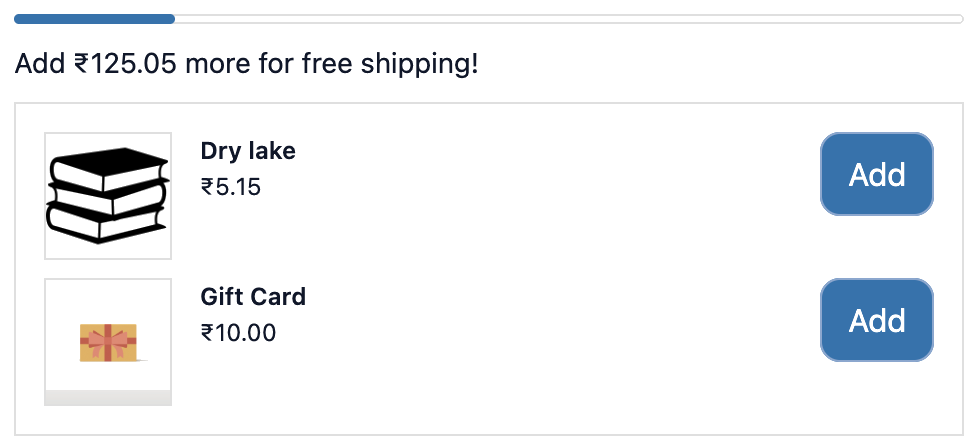
The Free Shipping Bar shows customers how close they are to qualifying for free shipping. It’s a simple but effective way to increase average order value as customers often add another item just to unlock free delivery.
How to set up
Section titled “How to set up”- Go to Free Shipping Bar in the app.
- Configure display settings (see below).
- Add Display Rules if needed.
- Click Save.
- In the Shopify checkout editor, add the Free shipping bar block to the checkout page.
Display settings
Section titled “Display settings”| Setting | Description |
|---|---|
| Status | Enable or disable the bar |
| Threshold type | Order total, Order weight, or Total cart items |
| Threshold amount | The minimum value to unlock free shipping. For Order total: currency amount (e.g. 50). For Order weight: weight in your store’s default unit (e.g. 2). For Total cart items: number of items (e.g. 3). |
| Message (before unlocked) | Text shown before the threshold is reached |
| Message (after unlocked) | Text shown once the threshold is met |
| Show progress bar | Display the visual progress bar |
| Recommended products | Toggle to show product suggestions below the bar |
| Recommended products list | Products to offer (only shown if price ≤ remaining threshold) |
| Conditions | Only show bar when cart matches conditions |
Use {amount} in the “before” message. The extension replaces it with the exact amount remaining — currency for Order total (e.g. $12.50), weight for Order weight (e.g. 1.2 kg), or item count for Total cart items (e.g. 2 items).
- When Recommended products is on but no products are selected, the recommendation section will not appear in the extension.
- Threshold type
Order totaluses the store’s default currency. - Threshold type
Order weightuses the store’s default weight unit. - Threshold type
Total cart itemscounts the total number of items (quantity) in the cart. - Works on checkout page only.
Use cases
Section titled “Use cases”| Scenario | Conditions to set |
|---|---|
| Show bar to all customers (most common) | No conditions |
| Show only when customer has not yet qualified | Cart total is less than threshold (built-in, the bar handles this automatically) |
| Show only for domestic customers (free shipping not available internationally) | Country is your domestic country |
Best practices
Section titled “Best practices”- Match the threshold exactly to your free shipping offer in Shopify’s shipping settings. A mismatch confuses customers.
- Use
{amount}in the before-unlock message: “Add {amount} more to get free shipping!” is more compelling than a static message. - Add 2–3 low-cost recommended products below the bar. Items priced just under the remaining amount work best.
- Update the threshold if you change your free shipping policy in Shopify as they are not linked automatically.
- A/B test threshold levels (e.g. $50 vs $75) using conditions to show different configurations to different cart segments.