Cart Line Items lets you control which UI controls appear on each product in the checkout cart (quantity stepper, variant selector, and remove button) and optionally display a dynamic message or badge on individual line items.
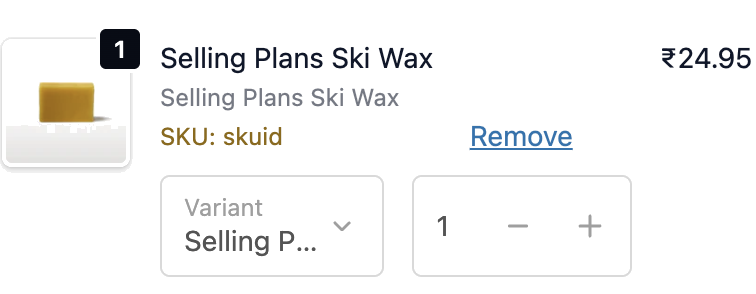
- Go to Cart Line Items in the app.
- Configure display settings (see below).
- Add Display Rules as per your requirement.
- Click Save.
- In the Shopify checkout editor, add the Cart Line Item Controls block to the checkout page.
| Setting | Description |
|---|
| Status | Toggle to enable or disable the extension |
| Show quantity stepper | Lets customers increase or decrease Item quantity in the cart |
| Show variant selector | Lets customers switch variant (size, colour, etc.) without leaving checkout |
| Show remove button | Lets customers remove items from the cart during checkout |
| Setting | Description |
|---|
| Message text | The text to display. Supports dynamic placeholders (see below) |
| Appearance | How the message looks: Plain text, Success (green), Warning (yellow), or Critical (red) |
| Visibility conditions | Show the message only when a specific line item property or cart attribute key (and optionally value) matches |
Supported placeholders in message text:
| Placeholder | What it shows |
|---|
{{ sku }} | The product’s SKU |
{{ property:key }} | A line item property value (e.g. {{ property:gift_message }}) |
{{ cart_attribute:key }} | A cart attribute value |
- Supports conditions. You can show or hide controls based on cart total, product tags, customer tags, and more.
- Visibility conditions on the line item message are separate from the main extension conditions and target individual line items rather than the whole cart.
- Shows on checkout only.
| Scenario | Conditions to set |
|---|
| Show a “Personalised” badge on custom products | Visibility condition: line item property key = personalised |
| Show quantity stepper only for repeat buyers | Extension conditions: Customer order count is greater than 0 |
| Show a warning badge on items with long lead times | Visibility condition: line item property key = lead_time, show Warning appearance |
| Show the SKU for B2B customers who reference it in orders | Extension conditions: Customer tag contains wholesale, use {{ sku }} in message |
- Only enable the controls your customers genuinely need. Showing all three (quantity, variant, remove) clutters the cart.
- Use the Warning appearance for messages like “This item ships in 5–7 days” to visually flag it without alarming the customer.
- Use line item property placeholders (
{{ property:key }}) to surface custom product data (engraving text, personalisation, monogram) directly in the cart.
- Test with products that have and don’t have the property set to ensure the message visibility conditions work as expected in both cases.
