
Buy Again - Thank You Page
The Buy Again - Thank You Page extension shows the items from the order the customer just placed, so they can reorder in one click right after checkout.
Requirements
Section titled “Requirements”- Works on all Shopify plans.
Where It Appears
Section titled “Where It Appears”Shows as an app block on the thank you page, which is the screen customers see immediately after completing checkout.
How to Enable
Section titled “How to Enable”- Open the app Dashboard and click Open Thank You editor
- Click Add app block
- Find Buy Again – Specific Order and click Add
- Position it in the thank you page and click Save
What Customers See
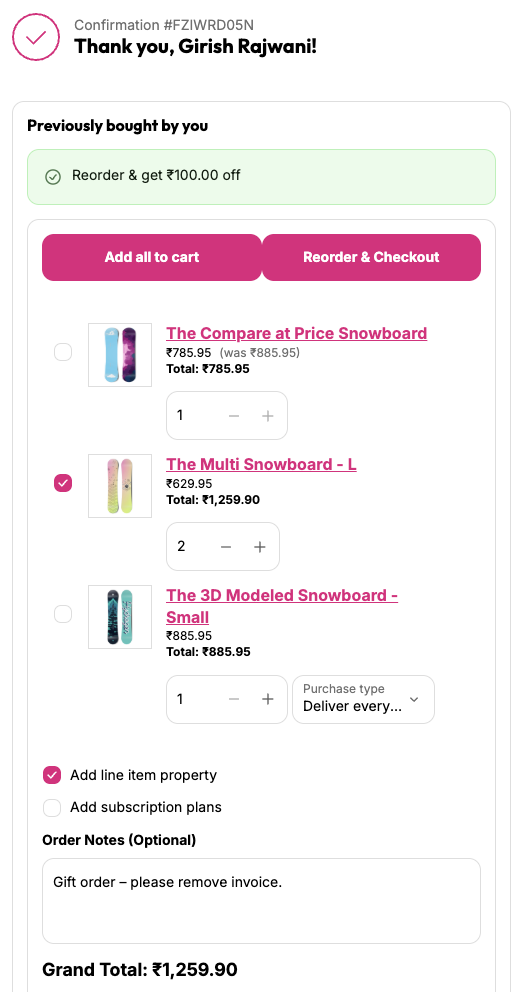
Section titled “What Customers See”- The products from the order they just placed with product image, name, and price
- Option to select individual products or all at once
- Add selected to cart adds only the selected items to cart. Add all to cart adds all items from the order.
- Option to carry over line item properties from the original order
- Reorder discount from Settings applied automatically (if enabled)
- Option to add items with a subscription selling plan (if your products have selling plans)