
Buy Again - Reorder Slider
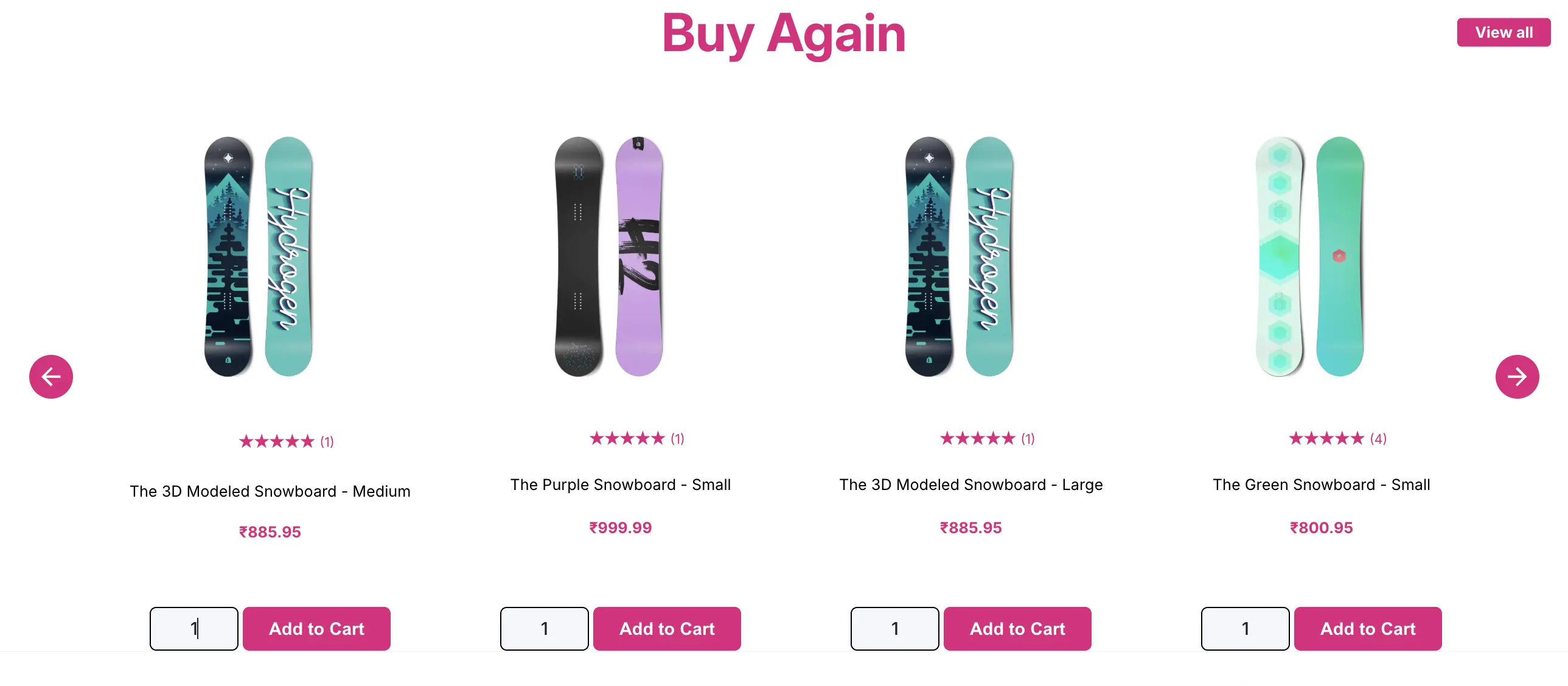
Buy Again - Reorder Slider adds a personalized product slider to your storefront. When a logged-in customer visits, they see a horizontal scrolling carousel of products they’ve bought before, making it effortless to reorder without searching.
Requirements
Section titled “Requirements”- An Online Store 2.0 theme is required. Older vintage themes are not supported.
- Only visible to logged-in customers with at least one previous order. For guests or customers with no order history, the buy again section hides itself automatically.
Where It Appears
Section titled “Where It Appears”This is a theme section block that you can add via the Shopify theme editor. It can be placed on:
- Home page
- Collection pages
- Product pages
- Any other page that supports theme sections
How to Enable
Section titled “How to Enable”- Open the app Dashboard and click the page button under Buy again slider -> choose Product, Cart, Collection, Blog, or Search to open the editor for that page directly
- In the left sidebar, click Add section
- Find Buy Again under the Apps section and click Add
- Position it in the layout
- Configure the settings in the sidebar (see in the next section)
- Click Save
What Customers See
Section titled “What Customers See”A horizontal scrolling product carousel showing items the customer has previously purchased. Each card shows the product image, name, and price, with an add-to-cart button. Only visible to logged-in customers with at least one previous order. Customers with no history or guests see nothing.
Settings
Section titled “Settings”All settings are configurable in the theme editor sidebar when the Bought By You section is selected.
Layout & Behavior
Section titled “Layout & Behavior”| Setting | Description |
|---|---|
| Auto slide products | Automatically scrolls through products without the customer swiping |
| Hide scroll bar at bottom | Hides the horizontal scrollbar for a cleaner look |
| Hide left & right arrows | Removes navigation arrows. Customers scroll by swiping or dragging. |
Colors
Section titled “Colors”| Setting | Description |
|---|---|
| Loader / Spinner color | Color of the loading spinner while products are being fetched |
| Heading text color | Color of the section heading |
| Slider border color | Border color around the entire slider container |
| Slider background color | Background fill of the slider area |
| Image border color | Border around each product image card |
| Product name color | Text color for product titles |
| Price color | Text color for product prices |
Button & Text
Section titled “Button & Text”| Setting | Description |
|---|---|
| Add to Cart button background color | Background color of the button on each product card |
| Add to Cart button text color | Text color on the button |
| Add to Cart button text | Label on the add to cart button for example, Buy Again, Add to Cart, Reorder |
| Add to Cart message | Short confirmation text shown after an item is added to cart |
| Add to Cart message color | Color of that confirmation message |
| View All button background color | Background of the “View All” button |
| View All button text color | Text color of the “View All” button |
Heading
Section titled “Heading”| Setting | Description |
|---|---|
| Heading alignment | Left, center, or right alignment for the section title |