What is a reorder reminder?
A reorder reminder (also called a replenishment reminder or refill reminder) is an automated email sent to a customer after they purchase a consumable product, nudging them to reorder before they run out. Unlike a subscription, there is no automatic charge — the customer simply receives a timely email with a one-click checkout link and, optionally, a reorder discount.
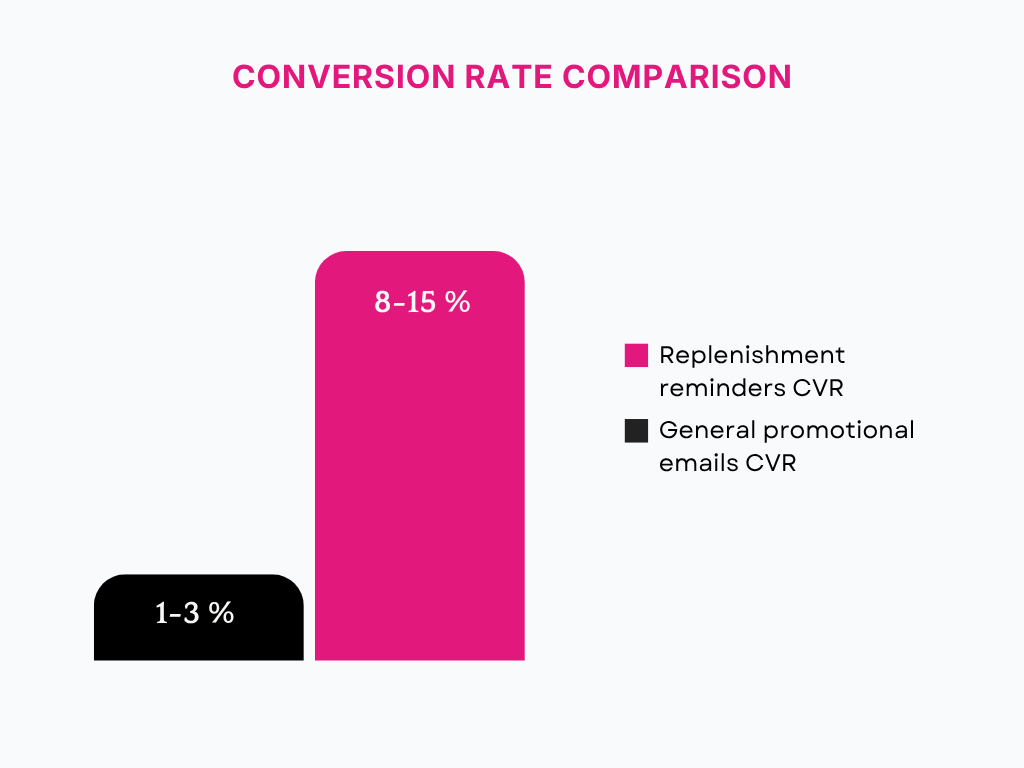
Replenishment reminders convert at 8-15% as compared to 1-3% for general promotional emails. This is not a coincidence because if a customer bought a consumable product from your Shopify store, then chances are high that customer will need that product again, and reminding them at the right time with a one-click checkout link and a discount will increase the chances of repeat orders and eventually will increase repeat sales.
The best part about reorder reminders (or replenishment reminders) is that they feel more personalised. Customers who receive personalised experiences are 60% more likely to become repeat buyers. 64% of customers are ready to spend more on a brand that remembers them and offers a personalised experience to them.
Now, the question isn’t whether reorder reminders work. It’s which type of reminder fits your Shopify store based on how your customers actually buy and how your products actually get used.
Let’s dive deep into 3 types of reorder reminders, how they work and which one your Shopify store needs to increase repeat sales.
3 types of reorder reminders
1. Customer-defined reorder reminders
Once a customer places an order, allow them to choose when they want to receive notifications about specific products. Customers will have full flexibility in terms of how frequently they want to be reminded and exactly about which products.
How it works
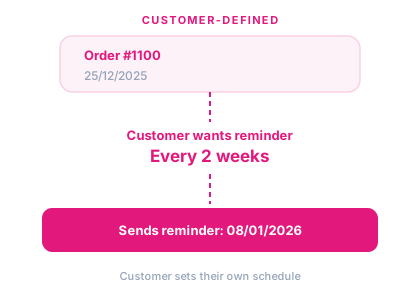
After an order is confirmed, show a widget on thank you page and order status page, with all the products purchased in that order along with an option to set reminder frequency. Customers choose reminder frequency and product for which they want reminders. Based on that, send automatic reorder reminder emails with the one-click checkout link and reorder discounts to remind them that it’s time to purchase those.
For example, after placing an order on 1st March, a customer sets the reminder frequency to every 3 weeks for a skincare product. They will receive reorder reminders every 3 weeks, starting 22nd March.
Who is it for?
It works best for Shopify brands with a strong repeat customers base who already know how they use the product. Skincare customers who know exactly how long the serum lasts or coffee drinkers who know when they will need the next coffee box.
Additionally, if customers hesitate to opt for subscriptions for some products on your Shopify store and want to be reminded about those products at a regular interval defined by them, then consider choosing customer-defined reorder reminders.
Why it works
Customers who set their own reminders have already decided to purchase again, and there is no friction between the decision and the actual purchase. Additionally, you are sending a reminder at the right time because the customer wants you to do so.
Where it falls short
It requires action upfront, and customers who are not used to setting reminders after placing an order will just skip this.
Your customers should be aware of this feature of setting reminders. To make them aware of this feature, you can inform them about “setting reminders” in the order confirmation email along with the “view order” link, which will redirect the customer to the orders page where they can set a reminder.
2. AI-based reorder reminders
Shopify stores have customers that place orders randomly, and there is no predictable pattern. That’s where the AI-based reminders come to the rescue. No action is needed from the Shopify merchant or customer. It just runs automatically and sends reminders after analysing order history.
How it works
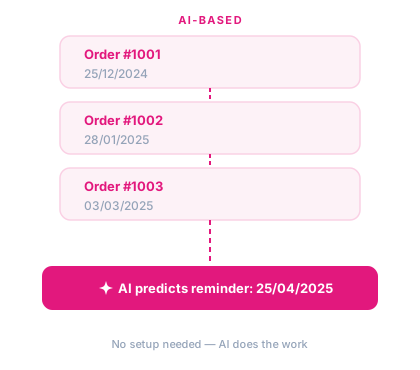
AI tracks the pattern of customer order history, and based on that history, it predicts the next reminder date.
Who is it for?
Sometimes it is hard to detect purchase patterns manually based on order history, and for Shopify stores having customers that buy in uncertain patterns, AI can help analyse the order date and variant patterns, and based on that, reorder reminders are sent, and next time, with more orders, AI learns and adjusts the next reorder reminder date.
Why it works
There is no friction, as customers don’t need to select anything, and they receive well-timed reminders. Additionally, this type of reminder is like a personalised suggestion which increases the chances of conversion, as compared to a general campaign.
Where it falls short
Order history is required for analysing order date and variant patterns, and without that, prediction becomes difficult for the model. For new stores or stores with fewer orders, prediction is not possible.
3. Usage-based reorder reminders
In this type of reorder reminder, the Shopify merchants set the usage rates either for each product or at a global level for all products. No action from the customer’s side is required.
How it works
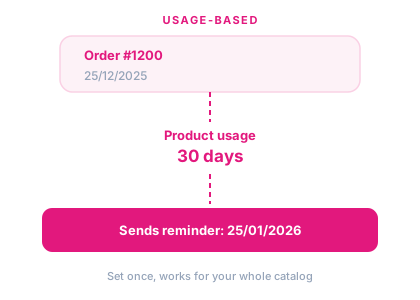
Shopify stores have products with variable usage rates, and some stores have products with the same usage rates. Based on that, Shopify merchants set the usage rate for each product or the global usage rate for all products, for example, 30 days for per-supply products, and they want to send email 3 days before, and once that number of days has passed after a customer has placed the order, a reminder is sent automatically. Assuming an order is placed on 1st March, then a reorder reminder will be sent on 27th March.
Who is it for?
For Shopify stores selling consumable products like pet supplies, health supplements, protein bars, food and beverages. If the products have predictable usage rates, then this type works from day one after the order is placed, irrespective of order history.
Why it works
A Shopify merchant configures a product once, and every customer who purchases it will receive reorder reminders automatically. It’s the most accurate type for product-specific usage cycles. Usage-based reminders are sent at the right time when the customer actually needs the product. It also handles a problem that AI-based reminders can’t, i.e., new customers with zero order history still get a reorder reminder at the right time.
Where it falls short
Some customers might run out of the product early, and some customers might not run out even after usage days have passed. In that case, calculating the average and choosing a sweet spot of usage days for products will help, but still there might be some imprecision depending on various customers.
How to pick for your store?
The right choice depends on what you know about your products and customers, not on what sounds most sophisticated.
You sell consumables with a known use cycle: Start with usage-based reminders. If you are a supplement brand, a pet food store, or a coffee store and if you know how long your product lasts, you can configure this today and have every customer in the reorder email queue by tomorrow. No data needed, no customer action required. Usage-based is the highest-confidence starting point for Shopify stores with consumable products.
You have a strong repeat buyer base but variable purchase patterns: Start with AI-based reminders. If customers are reordering but not on a predictable schedule, then maybe they stock up sometimes and run low other times. AI picks up patterns that a fixed-day timer would miss. This works best as a complement to usage-based, not as a replacement.
You have engaged customers who know their routines. Add customer-defined reminders. Some customers just want control. They know their usage, they know their schedule, and they’ll set a reminder themselves if you make it easy. Customer-defined works particularly well for higher-AOV products where the customer is certain about when to reorder.
You’re a new store or early in building repeat buyers: Start with usage-based and customer-defined. AI prediction needs order history you don’t have yet. Usage-based works from day one. Customer-defined captures intent from buyers who are already engaged. Build the habit first, and add the AI layer once you have enough orders.
If you are planning to set up reorder reminders on your Shopify store, Buy Again & Reorder Reminders supports all three types — usage-based, AI-based, and customer-defined — with custom email templates, custom branding, and connects with Klaviyo, Omnisend, Brevo, Mailchimp, and custom email service provider.
Comparison between 3 types of reorder reminders
| Customer-defined | AI-based | Usage-based | |
|---|---|---|---|
| Set up by | Customer | Nobody | Merchant |
| New customers | Yes | No | Yes |
| Order history needed | No | Yes (2 min) | No |
| Customer action | Yes | No | No |
| Best for | Skincare, coffee, candles, essential oils, personal care | Specialty food, gifting, hobby & craft, fashion, furniture, electronics, or stores with irregular reorders | Supplements, pet food, protein bars, baby food, cleaning products, contact lenses |
Important points to keep in mind while sending reorder reminders
Whether you call it a replenishment reminder email, a refill reminder, or a restock reminder — the same principles apply to all three types.
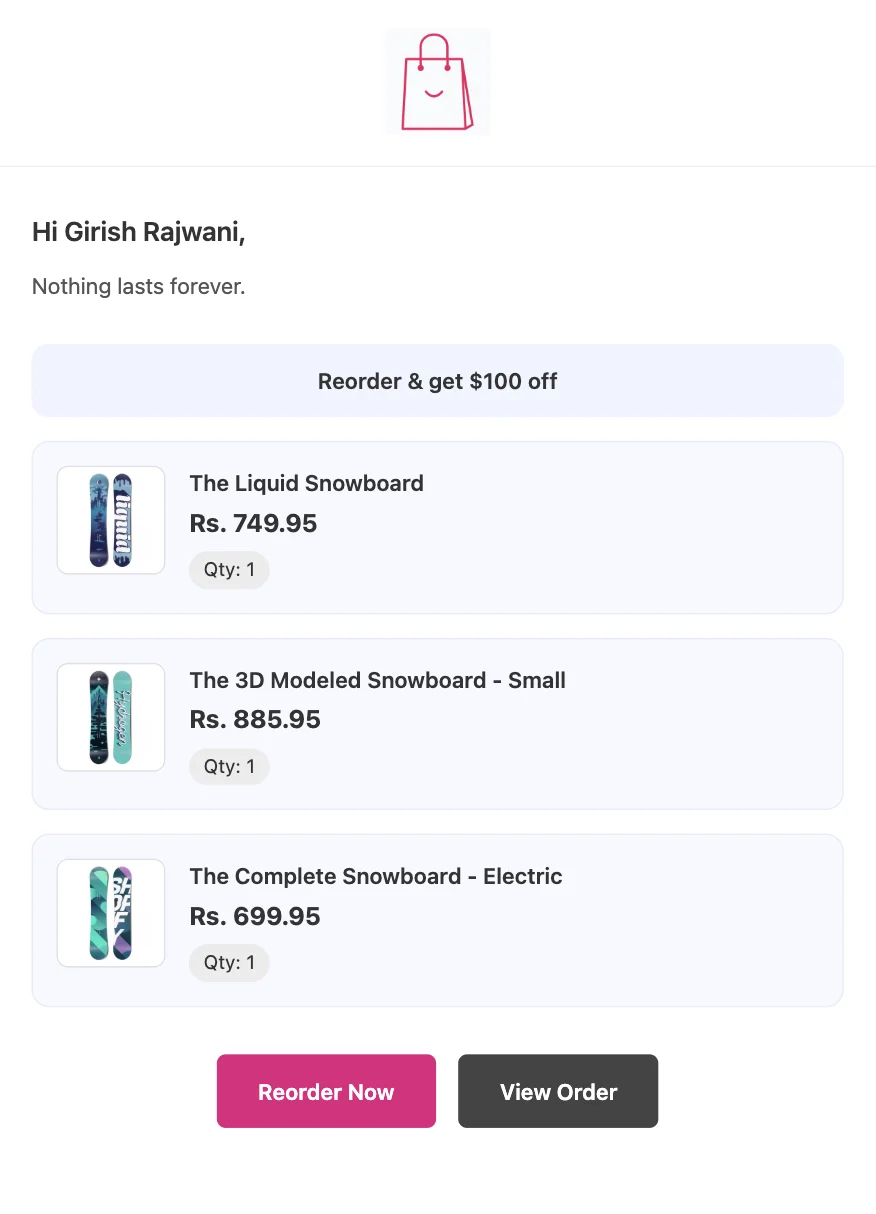
Send at the right time. Send the reorder email a few days before the product is expected to run out, factoring in your average shipping time. If shipping takes 3 days and usage days are set to 35, send the reminder on day 30–32. Review the results and adjust the timing with each iteration.
Use a one-click checkout link. Less friction means a higher conversion rate. Always include a reorder link that redirects to a pre-filled cart so the customer can check out directly without navigating anywhere else on your site.
Include a reorder discount. A small discount can tip the decision, especially when the customer is already planning to reorder a consumable product.
Keep it short and simple. A replenishment reminder email doesn’t need to be long — 2–3 lines of text, the product(s) that need reordering, a discount code, and a checkout link are enough.
Don’t oversend. One well-timed reorder email is usually enough for a customer who genuinely needs to restock. Sending too many emails risks unsubscribes and will damage your sender reputation over time.
I hope implementing reorder reminders will help you improve repeat sales on your Shopify store.